Graceful Shutdown
Graceful shutdown allows in-flight requests to complete before the gateway terminates, preventing request failures during deployments and restarts.
Overview
Clean Termination
Allow existing requests to finish rather than abruptly closing connections.
Zero-Downtime Deployments
Deploy updates without causing client-visible errors.
Configurable Grace Period
Control how long to wait for in-flight requests.
API Control
Trigger shutdown programmatically via HTTP API.
Why Graceful Shutdown?
Without graceful shutdown:
- Abrupt termination: Active requests are immediately disconnected
- Client errors: In-flight requests return connection errors
- Data loss: Streaming responses may be truncated
- Deployment failures: Rolling updates cause visible errors
With graceful shutdown:
- Request completion: Active requests finish normally
- No client errors: Users don't see deployment-related failures
- Clean streaming: Streaming responses complete before shutdown
- Smooth deployments: Zero-downtime rolling updates
How It Works
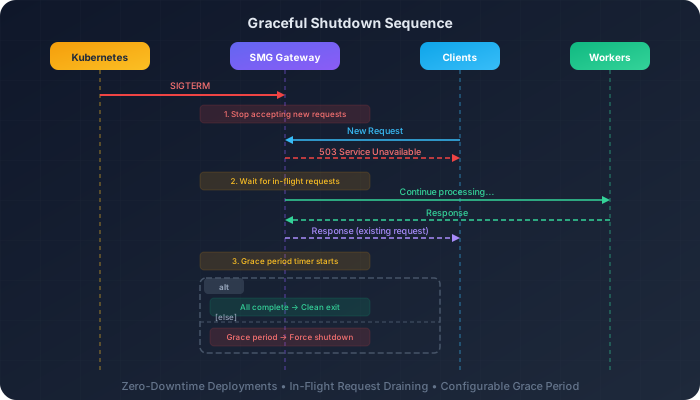
Shutdown Sequence
- Shutdown signal received (SIGTERM or SIGINT). The mesh-only
/ha/shutdownAPI triggers a separate mesh-level broadcast path and is not part of this signal-driven sequence. - Stop accepting new connections —
axum_server's handle stops the TCP accept loop and marks the in-flight tracker as draining; new connections are refused at the socket level rather than receiving a 503 response. From this moment/readinessreports503(reason"draining") while/healthand/livenessstay200, so load balancers de-list the pod without restarting it. - Drain in-flight requests — existing requests continue processing while the server waits on the in-flight tracker.
- Grace period timer starts — after
--shutdown-grace-period-secs, the drain wait times out and the server forces shutdown with any remaining requests still in-flight. - Clean exit — once all requests complete (or the grace period expires), background components (MCP orchestrator, etc.) are cleaned up and the process exits.
Configuration
Parameters
| Parameter | Default | Description |
|---|---|---|
--shutdown-grace-period-secs | 180 (3 min) | Time to wait for in-flight requests |
Recommended Configurations
Production Standard
Balanced grace period for typical workloads.
Use when: Standard production deployments
Batch Processing
Long grace period for long-running requests.
Use when: Batch inference, long-running generations
Critical Low-Latency
Minimal grace for latency-sensitive systems.
Use when: Very short requests, rapid scaling
Triggering Shutdown
Via Signal
# Find the SMG process
pgrep -f smg

# Send SIGTERM for graceful shutdown
kill -TERM <pid>

# Or SIGINT (Ctrl+C in terminal)
kill -INT <pid>
Via API
The /ha/shutdown endpoint lives on the main gateway port (default 30000) and requires mesh mode (--mesh-* flags). Without mesh enabled the endpoint returns 503 Service Unavailable. The mesh handler broadcasts a LEAVING status to peer nodes and stops the mesh rate-limit task — it does not share the same in-flight drain path used by the signal handler.
Kubernetes Integration
Kubernetes sends SIGTERM by default when terminating pods. Configure terminationGracePeriodSeconds to match or exceed your SMG grace period:
apiVersion: apps/v1
kind: Deployment
metadata:
  name: smg
spec:
  template:
    spec:
      terminationGracePeriodSeconds: 210  # SMG grace + buffer
      containers:
        - name: smg
          args:
            - --shutdown-grace-period-secs=180
Kubernetes timeout
Kubernetes will force-kill the pod after terminationGracePeriodSeconds. Set this higher than --shutdown-grace-period-secs to ensure SMG has time to complete its graceful shutdown.
Sizing the Grace Period
Consider these factors when setting the grace period:
| Factor | Impact on Grace Period |
|---|---|
| Average request duration | Grace period should exceed typical request time |
| Longest expected request | Batch jobs may need longer grace periods |
| Streaming responses | Long streams need extended grace periods |
| Deployment frequency | Frequent deployments may need shorter periods |
| Scaling responsiveness | Autoscaling may need faster termination |
Calculation Guidelines
Example: If your average request is 30s, p99 is 60s, and max streaming is 120s:
Integration with Load Balancers
For zero-downtime deployments, coordinate with your load balancer:
Pre-Stop Hook (Kubernetes)
Remove the pod from the load balancer before shutdown:
The sleep allows the load balancer to stop sending new traffic before SMG begins its graceful shutdown.
Health Check Coordination
As soon as SMG receives the shutdown signal and begins draining, /readiness flips to 503 Service Unavailable with reason "draining", while /health and /liveness keep returning 200 OK throughout the drain. Kubernetes therefore removes the pod from Service endpoints (stopping new connections) without restarting it:
curl http://gateway:30000/health
# Returns 200 OK both during normal operation and throughout the drain

curl http://gateway:30000/readiness
# 200 while serving; 503 {"status":"not ready","reason":"draining"} once shutdown begins
/readiness also returns 503 when no healthy workers remain (or, in prefill/decode mode, when either side has no healthy worker), independent of the shutdown signal. The readiness decision is maintained event-driven from worker registry state and served from cached memory, so probes stay O(1) regardless of fleet size.
Dedicated Probe Port
Under heavy load the main listener's probe routes share the request runtime, so probe responses can lag behind request traffic. Pass the --health-check-port flag (Python: health_check_port) to additionally serve /liveness, /readiness, and /health on a dedicated plain-HTTP port, handled by a small isolated runtime on its own OS thread — probe latency then stays flat even when the request runtime is saturated, and the port keeps answering through the entire drain window:
spec:
  containers:
    - name: smg
      args: ["--health-check-port", "30001"]
      livenessProbe:
        httpGet: { path: /liveness, port: 30001 }
      readinessProbe:
        httpGet: { path: /readiness, port: 30001 }
When --health-check-port is unset no extra listener is started. The probe routes always remain available on the main port as well.
Monitoring
Shutdown Events
Watch logs for shutdown-related messages:
# Signal received
INFO Received Ctrl+C, starting graceful shutdown
# or
INFO Received terminate signal, starting graceful shutdown

# Gate — in-flight tracker is marked draining and the accept loop stops
INFO Beginning graceful shutdown: gating new connections in_flight=5

# Drain completes within the grace period
INFO All in-flight requests drained

# Or the grace period expires with requests still running
WARN Drain timed out, forcing shutdown with requests still in-flight remaining=2 timeout_secs=180

# Component teardown
INFO HTTP server stopped. Starting component cleanup...
INFO Cleanup complete. Process exiting.
Metrics During Shutdown
| Metric | Observation |
|---|---|
smg_worker_requests_active | Should decrease towards 0 |
smg_http_requests_total | New requests should stop |
Tuning Guidelines
| Symptom | Potential Adjustment |
|---|---|
| Requests failing during deployment | Increase --shutdown-grace-period-secs |
| Slow scaling down | Decrease --shutdown-grace-period-secs |
| Kubernetes force-killing pods | Increase terminationGracePeriodSeconds |
| Streaming responses truncated | Match grace period to max stream duration |